The template
The Angry Dance Filter CapCut template, explained
Angry Dance Filter started as the name of a CapCut template by VCap for the argument version of the Bad Times dance, the Imael Angel trend that took off on TikTok in September 2026. This site, Angry Dance Filter, makes the same dance from one photo in your browser.
With a photo, there are two ways to make it: use the Angry Dance Filter template in CapCut’s app or web editor, or skip the editor and let AI animate the photo here. You can also film the dance yourself.
Updated October 27, 2026
Where does the name Angry Dance Filter come from?
It comes from VCap’s CapCut template of the same name. In it, a gray-haired man in glasses argues in a wooden doorway: he points toward the camera, holds his palms out, shrugs and turns to the side.
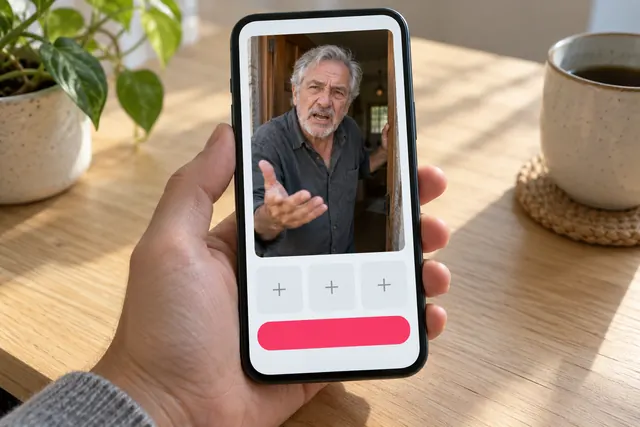
These are the moves of the Bad Times trend. Bad Times is a deep house single by Imael Angel, released on March 30, 2026. On TikTok, people lip-sync it as an argument with whoever holds the camera, and the argument keeps escalating, though nobody actually speaks. VCap’s template is the argument version of that dance, so Angry Dance Filter and Bad Times are two names for the same dance.
On TikTok the dance is tagged by the song, not the template. As of October 27, 2026, #badtimesimaelangel had 8,564 videos and 86.6M views and #imaelangeltrend had 8,217 videos and 65.7M views, while #angrydancefilter had 4.
Angry Dance Filter and the other Bad Times templates
These four templates, including the original Angry Dance Filter, all run about 15 seconds, and their use counts change daily.
| Template | Creator | Uses | What it shows |
|---|---|---|---|
| Angry Dance Filter | VCap | 40.45K | A gray-haired man in glasses arguing in a wooden doorway. 9:16, one media slot. |
| Bad times dance | zallmw_ | 34K | A baby doing the same moves as VCap’s template. 9:16, one media slot. |
| Sheldon Bad Times | Karata | 10.73K | A sitcom character doing a playful routine. 9:16, one media slot. |
| Aidance | Mila69429 | 94.11K | A baby in a white shirt pointing, holding its palms out, shrugging and turning to the side. |
Aidance by Mila69429 has the most uses of the four, and VCap’s Angry Dance Filter is the one the trend’s second name comes from. Pick Sheldon Bad Times by Karata if you want a playful routine instead of an argument.
How to use the Angry Dance Filter template in CapCut
- 1
Open CapCut
Use the app on your phone or the web version. Templates open in either one.
- 2
Find the template
Look for Angry Dance Filter and check that the creator is VCap; its template ID is 7691263789949275410. The same steps work for the other three templates in the table.
- 3
Tap “Use template”
Tap it, or click it on the web, to start your own version of the template.
- 4
Add your photo or video
Put it in the media slot. The photo tips at the end of this guide apply here too.
- 5
Preview
Play the preview through before you export. If the result looks off, try a clearer photo first.
- 6
Export
Export the video, then post it to TikTok or Instagram Reels.
Is there an Angry Dance Filter app?
Angry Dance Filter is the name of a CapCut template, not a TikTok effect or an app of its own. To use the original, you need the CapCut app or its web version.
If you would rather not install an editor, the Angry Dance Filter site needs no app. You upload one photo and pick a template, and AI motion control makes the person in the photo perform the dance. Generating needs an account (Google or email) and credits, and finished videos stay in My Creations so you can download them again.
CapCut template vs the AI version
| Detail | CapCut template | AI version on this site |
|---|---|---|
| What you need | The app or web editor, and a photo or video for the media slot | A web browser, one JPG or PNG photo up to 10 MB, an account and credits |
| Which dances | One routine per template, such as VCap’s argument dance or Karata’s Sheldon routine | Three templates: Angry Dance Filter (VCap’s argument dance), Sheldon dance and Angry lady dance (the kitchen clip) |
| Length | About 15 seconds for each of the four templates above | 5 s, 10 s or the full dance (15 s, or 14 s for Angry lady dance); shorter lengths keep the start |
| Resolution | Check before you export | 720p or 1080p |
| Sound | Play the template preview | Add the Bad Times sound from TikTok or Instagram when you post |
| Cost | Check in the app | Credits, shown before you generate: 4 to 17 per video, refunded automatically if a video fails |
The AI version uses the template clips as motion references, so the person in your photo performs the moves. A 5-second 720p video costs 4 credits and a 15-second 1080p video costs 17; every template costs the same for the same length, and a video usually takes a few minutes. The smallest credit pack is $6.99 for 10 credits, pack credits never expire, and pricing lists every pack and plan.
For a step-by-step walk-through of the AI version, see how to make a Bad Times AI video.
Tips for either route
- Face the camera. Front-facing, well-lit photos with the face and upper body visible work best.
- Match the photo to the dance. Full-body photos suit VCap’s argument dance and the Sheldon routine; a waist-up photo works for Angry lady dance, the kitchen version on this site.
- Pets and cartoon characters can work, but results vary.
- Only use photos you have permission to use. The acceptable use policy sets out this site’s rules.
- Post with the Bad Times sound. On TikTok, #badtimesimaelangel is the biggest of the trend hashtags we checked.
 Works
Works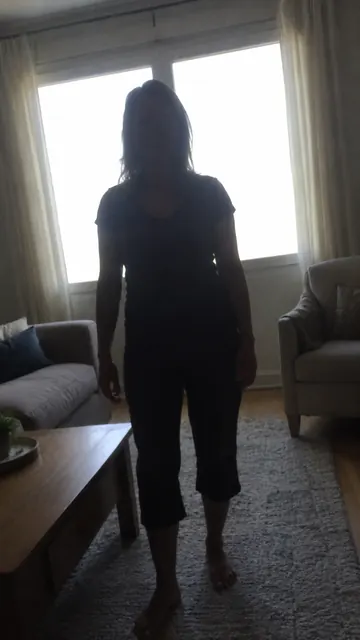 Too dark
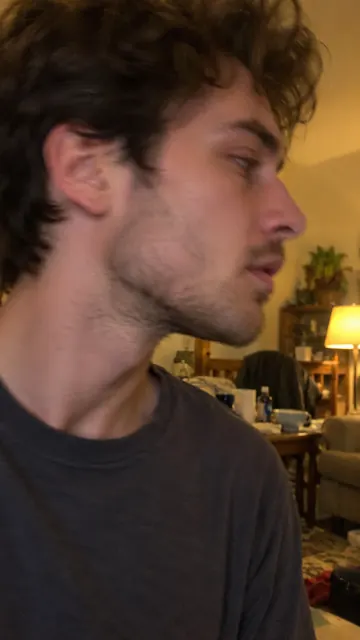 Cropped, side-on
Questions people ask
Is the Angry Dance Filter on CapCut?
Yes, Angry Dance Filter is a CapCut template by VCap, with 40.45K uses as of October 26, 2026. You open it in the CapCut app or the web version.
Is there an Angry Dance Filter app?
The original Angry Dance Filter is not an app of its own: it is a CapCut template, so you use it inside that editor. You can also make the same dance from one photo in a browser on this site without installing anything.
Is the Angry Dance Filter a TikTok filter?
No, Angry Dance Filter is the name of a CapCut template, not a TikTok effect. On TikTok the dance is tagged by the song instead: as of October 27, 2026, #badtimesimaelangel had 8,564 videos and #angrydancefilter had 4.
Can I use the Angry Dance Filter on a computer?
Yes, the template opens in CapCut’s web version as well as in the app. This site also runs in a web browser, on a computer or a phone.
What is the difference between the CapCut template and the AI version?
The CapCut template takes your photo or video inside the editor and runs about 15 seconds. The AI version turns one photo into the dance in your browser, at 5 s, 10 s or full length and 720p or 1080p, as an MP4 you post with the Bad Times sound from TikTok or Instagram.
How much does the AI version cost?
Each video costs 4 to 17 credits depending on length and resolution, and the cost shows before you generate. The smallest credit pack is $6.99 for 10 credits, and every video uses credits, including your first.
Sources
- Apple Music: BAD TIMES by Imael Angel — release date, March 30, 2026
- Deezer: Imael Angel — artist biography, deep house
- Official Charts: Imael Angel, Bad Times — UK chart history, checked October 27, 2026
Skip the app
Upload one photo, pick one of three templates and see the credit cost before you generate. Videos are usually ready in a few minutes.
Make it in your browser