How to
How to do the Angry Dance Filter (the Bad Times trend) on TikTok and Reels
To do the Angry Dance Filter, you act out an escalating argument with the camera to “Bad Times” by Imael Angel, lip-syncing instead of speaking. You can film it yourself on TikTok or Instagram Reels, use a CapCut template, or let the Angry Dance Filter on this site turn one photo of you into the same routine with AI.
Updated October 27, 2026
What does the Angry Dance Filter look like?
The camera plays the other side of the fight. You lip-sync at whoever is holding it while the argument builds from a point at the lens to a side turn, and nobody actually speaks. The sound is “Bad Times,” a deep house single by Imael Angel released on March 30, 2026, and the trend took off on TikTok in September 2026.
Angry Dance Filter is the name of VCap’s CapCut template for this argument version, and of this site. People also search for it as the Imael Angel trend, the angry lady dance and the heated-argument or dispute trend. For where it came from and the best-known versions, see the Angry Dance Filter trend explained.
How to do the Bad Times trend, step by step
- 1
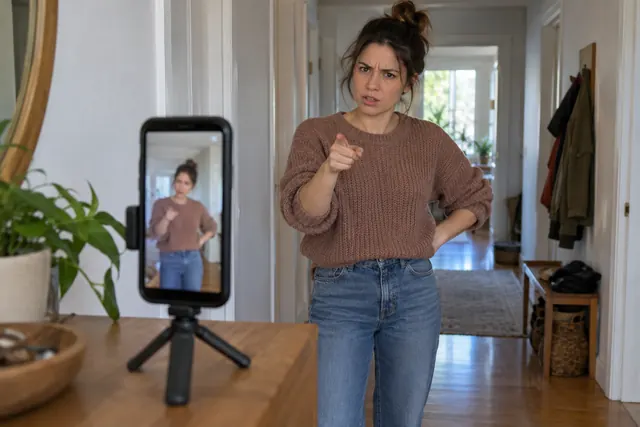
Set the phone up vertically at chest height
Hold the phone upright at about chest height, or have a friend hold it so you have someone to argue with. If you’re filming alone, prop it on something steady and use the countdown timer.
- 2
Frame yourself from the waist up or full body
Waist up keeps the focus on your face and hands, like the close-up kitchen version. Full body gives the lean and the side turn more room. Keep your head near the top of the frame.
- 3
Add the Bad Times sound from TikTok’s library
In TikTok’s camera, open the sound picker and search for Bad Times Imael Angel. Pick the one credited to Imael Angel, since Kairo West has an unrelated song with the same title. The sound then plays while you record.
- 4
Run the argument in order
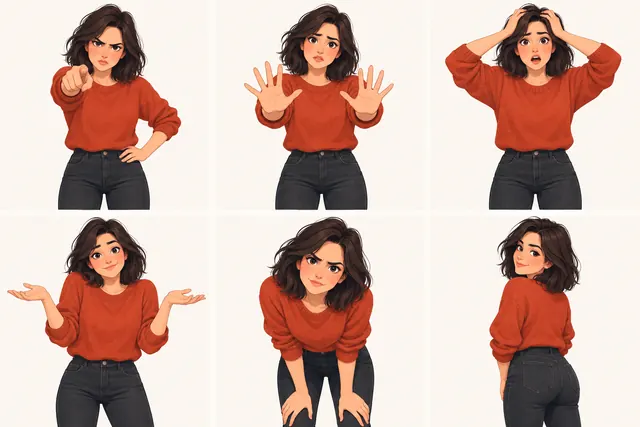
Point at the lens, throw your palms out, put your hands on your head, shrug, lean in toward the camera, then turn to the side. Make each move a little bigger than the last.
- 5
Keep a straight face and never speak
Don’t laugh or break character. Lip-sync the vocal as if it were your side of the argument, but never say anything out loud.
- 6
Record a few takes
Practice once or twice, then record two or three takes and keep the one where every move reads clearly.
- 7
Trim and post
Cut the dead time before your first point and after the turn, add a caption and the hashtags below, and post.
Use a CapCut template instead
CapCut is where the Angry Dance Filter name comes from. VCap’s Angry Dance Filter template runs about 15 seconds, vertical, with one media slot, and had 40.45K uses as of October 26, 2026. Open CapCut (the app or the web version), find the template, tap Use template, add your photo or video, preview and export.
Mila69429’s Aidance (94.11K uses) and zallmw_’s Bad times dance (34K) show a baby doing the same moves, and Karata’s Sheldon Bad Times (10.73K) gives a sitcom character a playful routine, all as of October 26, 2026. The Angry Dance Filter CapCut template guide has more on each of them.
Make it from one photo with AI
The trend also has an AI branch: people turn a single photo of a pet, a baby, a friend or a cartoon character into the same routine. The Angry Dance Filter does that with AI motion control. Upload one photo, pick a template, and the person in your photo performs its moves in a short vertical video.
- Angry Dance Filter
- VCap’s argument dance, 15 s. A full-body photo works best.
- Sheldon dance
- A playful Sheldon routine, 15 s. Also best with a full-body photo.
- Angry lady dance
- The kitchen clip, close-up, 14 s. A waist-up photo works.
Choose 5 seconds, 10 seconds or the full dance at 720p or 1080p. A full-length 720p video costs 10 credits, every template costs the same for the same length, and the cost shows before you generate. Videos are usually ready in a few minutes. The full walkthrough, with the credit table and photo tips, is in how to make a Bad Times AI video, or go straight to the generator.
Angry Dance Filter on TikTok: sound and hashtags
If you filmed inside TikTok with the sound added, you’re set. Otherwise, add the sound in TikTok’s editor: search for the song and set its start so the music lines up with your first move. Do the same with a video made with AI on this site, so the music comes from TikTok’s library and the license stays with the platform.
| Hashtag | On TikTok as of October 27, 2026 |
|---|---|
| #badtimesimaelangel | 8,564 videos, 86.6M views |
| #imaelangeltrend | 8,217 videos, 65.7M views |
| #angrydance | 340 videos, 3.0M views |
| #angrydancefilter | 4 videos |
Use the two big trend tags, #badtimesimaelangel and #imaelangeltrend. Add #angrydancefilter for people who know the dance by the template’s name.
Angry Dance Filter on Instagram Reels
Reels works the same way. Film vertically in the Reels camera or upload a vertical clip, including one made here, then add audio in the Reels editor: search for the same song and line it up with your first move. You can use the same hashtags, but the counts above are TikTok’s, not Instagram’s.
Common mistakes and how to fix them
- Camera too far away. Your point and your face end up tiny on a phone screen, so move closer.
- Not filling the frame. Empty wall above or beside you makes you look small. Keep your head near the top.
- Speaking. The joke is a whole argument with nothing said out loud, so lip-sync without making a sound.
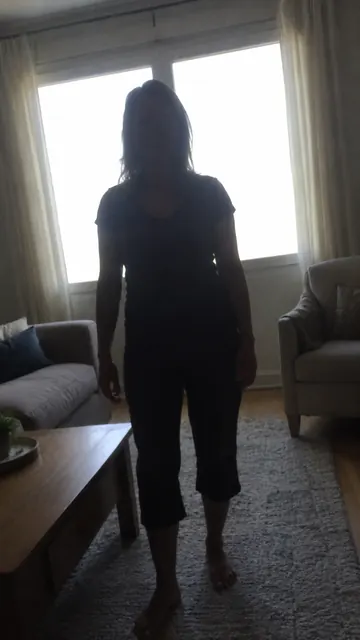
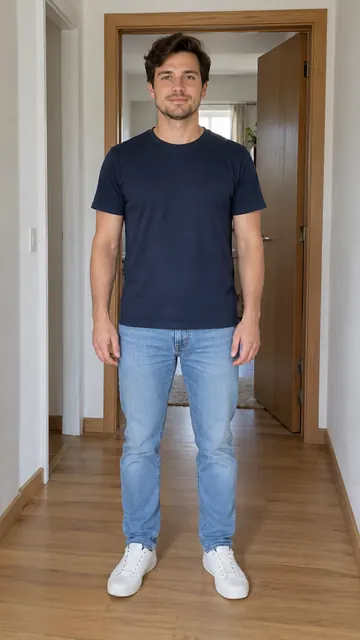
- Flat lighting. Dim overhead light flattens your face, and a window behind you turns it into a silhouette. Face the light instead.
- Starting at full anger. If the first point is already your angriest, there’s nowhere to go. Build up to the turn.
 Window behind you
 Light on your face
Questions people ask
What song is the Angry Dance Filter?
It’s “Bad Times” by Imael Angel, a deep house single released on March 30, 2026. Don’t confuse it with the unrelated “Bad Times” by Kairo West.
Do I need CapCut to do the Angry Dance Filter?
No. You can film it yourself in TikTok or Instagram with the Bad Times sound; CapCut is only for using a template such as VCap’s Angry Dance Filter.
How long should the video be?
About 15 seconds. That’s the length of the CapCut templates, and the full dances in our generator run 14 or 15 seconds.
Can I do the Angry Dance Filter on Instagram?
Yes. Film or upload a vertical clip in Reels, then add “Bad Times” by Imael Angel in the Reels editor.
What if I can’t dance?
You don’t need to, because the argument is acted more than danced. If you’d rather not be on camera at all, you can make an Angry Dance Filter video from one photo.
How do I add the song to an Angry Dance Filter video?
Upload the video to TikTok or Instagram and pick “Bad Times” by Imael Angel from the sound library, or add it in CapCut. Using the platform’s sound keeps the music license with the platform.
Sources
- Apple Music: the single — single, released March 30, 2026
- Deezer: Imael Angel artist page — biography describing a deep house producer
No time to film?
Upload one photo, pick one of three templates and get a vertical video of the dance, usually in a few minutes. Add the Bad Times sound when you post.
Make it from a photo