Step by step
How to make a Bad Times AI video from one photo
A Bad Times AI video makes the person in a single photo perform the argument dance from the trend: pointing at the camera, palms out, a shrug, a side turn. Angry Dance Filter works as a Bad Times AI video generator in your browser, using AI motion control to copy the moves of a template clip onto your photo, so nobody has to film you. To act it out on camera instead, see how to do the Angry Dance Filter.
The Bad Times trend took off on TikTok in September 2026, set to the song “Bad Times” by Imael Angel. The song itself is described as AI-made; for that side of “Bad Times AI”, see who is behind Imael Angel.
Short answer
Add one photo, pick a template, choose 5 s, 10 s or the full dance at 720p or 1080p, then sign in and generate. It usually takes a few minutes and costs 4 to 17 credits. Add the Bad Times sound from TikTok or Instagram when you post it.Updated October 27, 2026
What do you need to make a Bad Times AI video?
- One photo. A JPG or PNG up to 10 MB, front-facing and well lit, with the face and upper body visible.
- An account. Generating requires signing in with Google or email. You can choose the photo first; it waits in your browser until you sign in.
- Credits. A video costs 4 to 17 credits, depending on length and resolution. There are no trial credits, so you need a credit pack or a plan before your first video.
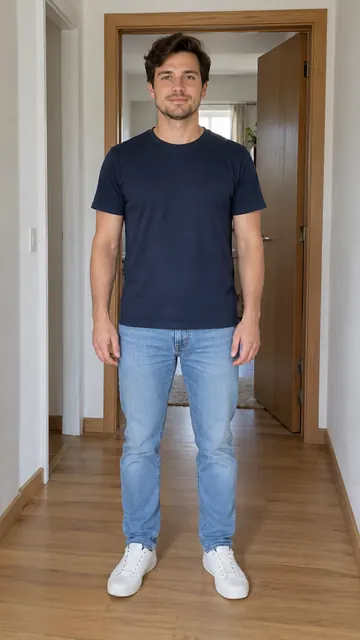 Full body
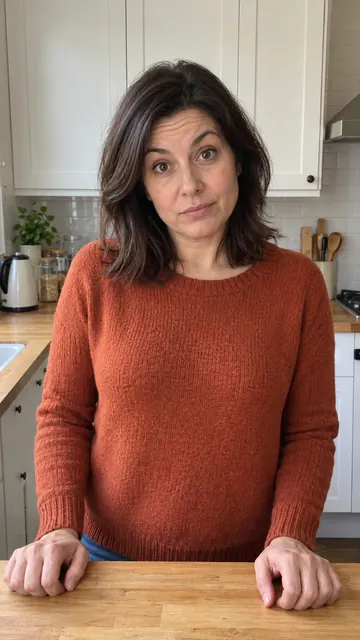 Waist-up
How to make a Bad Times AI video, step by step
- 1
Choose your photo
Open the generator and add one JPG or PNG up to 10 MB. You can do this before signing in: the photo waits in your browser and uploads after you sign in.
- 2
Pick a template
Choose Angry Dance Filter (the argument dance from VCap’s CapCut template), Sheldon dance or Angry lady dance (the kitchen clip). The first two work best with a full-body photo; a waist-up photo works for Angry lady dance.
- 3
Choose the length and resolution
Pick 5 s, 10 s or the full dance, and 720p or 1080p. Shorter lengths keep the start of the dance. The credit cost shows before you generate, from 4 credits for 5 s at 720p to 17 for 15 s at 1080p.
- 4
Sign in and generate
Sign in with Google or email, make sure your credit balance covers the cost, and start the video. It usually takes a few minutes.
- 5
Preview and download
When the video is ready, play the preview and download it. You get a vertical MP4.
- 6
Find it later in My Creations
Finished videos stay in My Creations, so you can come back and download them again.
- 7
Add the Bad Times sound when you post
Upload the MP4 to TikTok, Instagram or CapCut and add the Bad Times sound from the app’s library; the music license then stays with the platform.
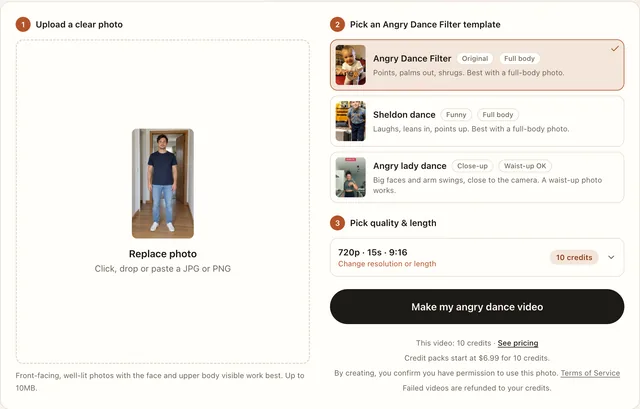
Which Bad Times template should you use?
Each template is a reference clip whose moves the AI copies onto your photo, so pick the one whose framing matches the photo you have. Angry Dance Filter and Angry lady dance both act out an argument with the camera, which is the trend’s basic format; Sheldon dance is a playful routine instead. The baby version, zallmw_’s Bad times dance CapCut template, uses the same moves as VCap’s, so Angry Dance Filter is the one that matches it.
| Template in the generator | Best photo | Full length | What it looks like |
|---|---|---|---|
| Angry Dance Filter | Full body | 15 s | The argument dance from VCap’s CapCut template: a gray-haired man in a doorway points at the camera, holds his palms out, shrugs and turns to the side |
| Sheldon dance | Full body | 15 s | A sitcom character doing a playful routine, from Karata’s Sheldon Bad Times CapCut template |
| Angry lady dance | Waist-up works | 14 s | A woman arguing in her kitchen, filmed close-up; one of the most-copied takes on the trend |
The kitchen version has its own page: the angry lady dance template. Angry Dance Filter is an independent website, not affiliated with CapCut, TikTok, ByteDance or Imael Angel.
How much does a Bad Times AI video cost?
Every template costs the same for the same length, so only length and resolution change the price. The generator shows the cost before you start.
| Length | 720p | 1080p |
|---|---|---|
| 5 s | 4 credits | 6 credits |
| 10 s | 7 credits | 11 credits |
| Full dance, 14 s (Angry lady dance) | 10 credits | 16 credits |
| Full dance, 15 s (Angry Dance Filter, Sheldon dance) | 10 credits | 17 credits |
The 5 s and 10 s versions are cut from the start of the dance, so they end partway through the routine. Pick the full dance if you want every move.
Credits come in one-time packs that never expire, from $6.99 for 10 credits to $499 for 3,000, or with monthly plans from $29.90 a month for 100 credits; annual plans and the full list are on the pricing page.
What photo works best for a Bad Times AI video?
- Face the camera. A front-facing photo with the face and upper body visible works best.
- Use good light. Pick a well-lit photo over a dark one.
- Match the template. Use a full-body photo for Angry Dance Filter and Sheldon dance; waist-up is enough for Angry lady dance.
- Check the file. JPG or PNG, up to 10 MB.
- Pets and cartoon characters can work, but results vary.
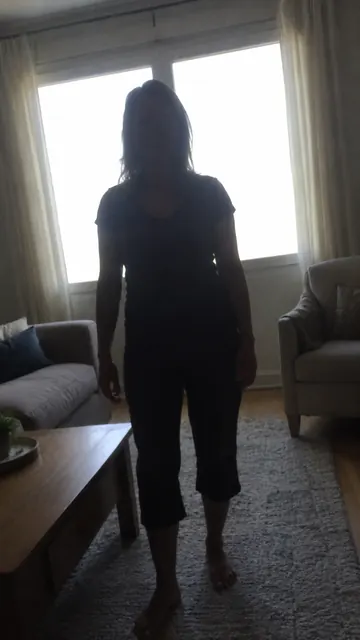 Too dark
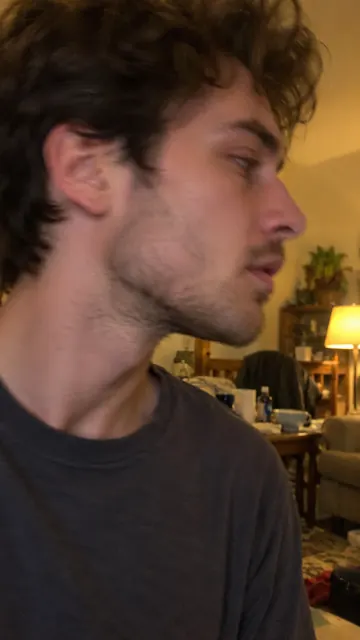 Cropped, side-on
What happens if a video fails?
If a video fails, its credits are refunded to your balance automatically, so a failed 15 s video at 1080p puts all 17 credits back. Before you try again, use a clearer photo or a template that fits it: Angry lady dance for a waist-up shot, Angry Dance Filter or Sheldon dance for a full-body one.
Can you use someone else’s photo?
Only if you have permission to use it. A photo of yourself is the simple case; for a friend, partner or coworker, ask them before you upload it. The acceptable use policy sets out what the site does not allow.
Questions people ask
Is it free to make a Bad Times AI video?
No. Every video costs credits, from 4 for 5 s at 720p to 17 for 15 s at 1080p, and there are no trial credits. The smallest pack on the pricing page is $6.99 for 10 credits, enough for one full-length video at 720p.
How long does it take to make a Bad Times AI video?
Usually a few minutes. Finished videos are saved in My Creations, so you can download them later.
How do I add the Bad Times song?
Pick the Bad Times sound from TikTok’s or Instagram’s sound library when you post, or add it in CapCut; the music license then stays with the platform.
Can I use a pet photo?
Pets and cartoon characters can work, but results vary; photos of people give the most reliable results. Credits come back automatically only when a video fails, not when a finished video looks off.
What resolution do I get?
You choose 720p or 1080p before you generate. 1080p costs more: a 15 s video uses 10 credits at 720p and 17 at 1080p.
Where do I find my videos later?
In My Creations. Finished videos stay there and can be downloaded again.
Make your Bad Times AI video
Pick a photo and a template; the credit cost shows before you generate.
Start with a photo